

The concept of caching steps in an ML workflow (Or any other workflow) is pretty simple: Skip the step execution if nothing changed. But there’s a surprising amount of complexity hidden behind what “nothing changed” means depending on the overall domain and many different step types. Another wrinkle is the interface a given customer may be using whether it be a client side SDK or direct API requests, not to mention other constraints such as avoiding public API contract changes or any disruption to in-flight workflows during rollout.
While a part of the AWS SageMaker org, I got to think through these ideas while delivering a project to revamp the way caching worked for SageMaker Pipelines’ Steps. A Pipeline allows multiple SageMaker jobs (Processing, Training, etc) to be packaged together as Steps in a single ML workflow, and provides useful orchestration primitives like retries, Step dependencies, and Step parallelism that control how the Steps’ downstream jobs are kicked off.
I liked the work because in this scenario caching necessarily touches many parts of the stack - open source Python SDK, synchronous APIs, and async workflows. It was also an opportunity to reason about some common AWS design considerations such as backwards compatibility and providing the right abstractions for our technical users.
An attempt at a caching solution had been rolled out much closer to the Pipelines’ product initial launch, but the growing complexity of the SageMaker Python SDK and other service updates had far outgrown its original scope and made it unusable. Standard cache behavior for Pipeline Steps would mean:
| Scenario | Outcome |
|---|---|
| A Pipeline is re-executed containing a Step that was previously executed with the same cache key configuration. | Cache hit: The Step does not re-execute, and the underlying job does not start. |
| A Pipeline is re-executed after a Step’s cache keys change, such as a preprocessing script. | Cache miss: The Step re-executes with the new configuration, and the underlying job starts. |
Goals
- Roll out Pipeline Step caching so cache hit / miss behavior functions as expected
- Extend cache coverage to all core Pipeline Step types
- Make changes backwards compatible, minimize disruption for customers
Customers interact with the Pipelines service in a variety of ways. Through the Python SDK, directly calling the APIs, or through a visual designer in Studio. The trick was to deliver the desired behavior without making customers have to change their code too much, so changes to the API contract weren’t ideal unless absolutely necessary. There’s also an incentive not to change the API shape in order to avoid the required and time consuming security review which accompanies such changes. Generally this also has the benefit of encouraging simpler approaches that introduce less risk into the service.
Here’s a high(ish) level summary of the three pronged approach that was delivered.
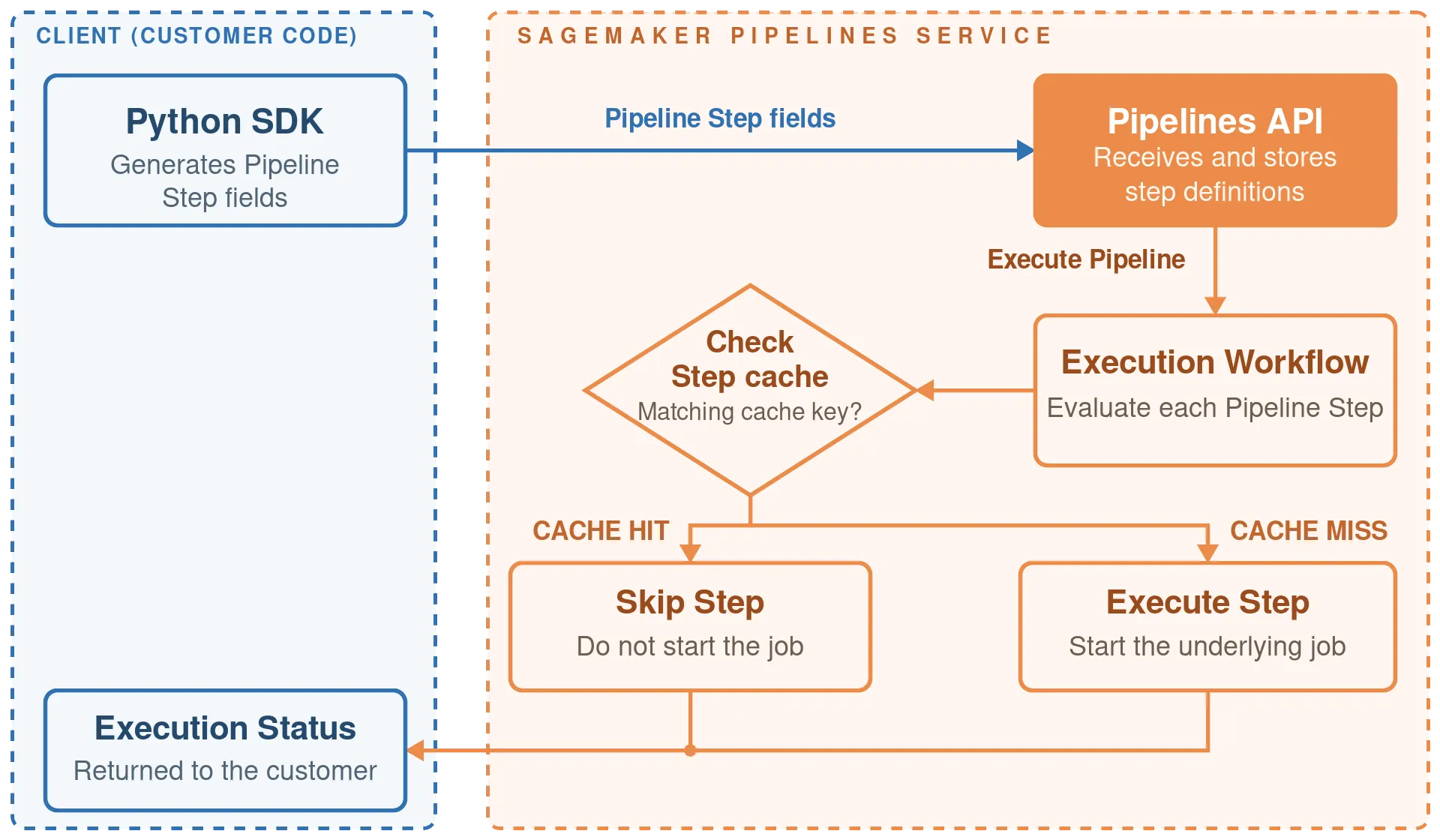
Figure 1: Overall caching flow1
1. Python SDK
Significant investment has gone into the SageMaker Python SDK to make it simpler and more intuitive to kick off Pipelines and interact with the other services, in a way that ML engineers and/or scientists would be accustomed to. It remains a central way in which technical customers use the service. With this in mind, a lot of heavy lifting for caching logic was added client side into the SDK. Here’s a quick review of how the SDK works for Pipelines:
The SDK provides its own objects and interface to the SageMaker APIs with additional abstractions around boto3. For example, a SageMaker job requires that any processing or training code scripts and datasets are uploaded to S3, and that S3 location must be provided in the request object. The Python SDK handles file uploads and translating proper request object fields, so users can build Pipelines and reference processing or training scripts from their local filesystem, without having to worry about uploading to S3 or massaging all the raw API request fields into the right shapes.
In a basic sense, a cache for a particular entity gets populated based on a few foundational properties of said entity (cache keys, which we’ll talk more about in the next section). If one of those foundational properties changes, then the old cache value doesn’t match anymore and a new one will be added. For Pipeline Steps, an obvious foundational property would be the code provided for the underlying job. If that changes, certainly a cache miss should occur and the job re-executed. Given that these artifacts are provided to the SageMaker APIs as S3 (or sometimes EFS, FSx) locations, how can we represent those changes?
There might be several approaches, but we defined a consistent path structure that included a hash of the file. Any time the contents of a processing or training script file changed and the Python Pipeline code is re-run, a new S3 object with a new path that reflects the file’s contents is created and passed along in the Pipeline Step definition.
Here’s an example of an S3 location that reflects the file’s contents via hash and also its name, and I included more info on S3 pathing structures in the docs here.
s3://mybucket/mypipeline/code/5373a64586b720d400d7129dd72af164/processing.pyTo do this in a way that doesn’t blow up customers’ S3 buckets with a bunch of disparate S3 objects that aren’t obviously associated with a particular Pipeline or Step took some careful thought. Without getting too far into the complexity of how the Python SDK is designed, the solution that gave us a clean path forward involved the use of Python’s @contextmanager decorator.
This allowed us to maintain Pipeline, Step, and code hash information throughout the creation of a Pipeline object and its Steps, and use those pieces of information in a hierarchical naming convention that helped organize all a Pipeline’s S3 objects during its lifetime.
There were many cascading changes required to allow this to happen and I was able to recruit another trusty engineer, guide them through the requirements and knock them out together.
2. New Default Cache Keys
In order to enable caching across a variety of Step types, the same foundational question must be asked for each one: What properties of the Step should be included in the cache key calculation? In other words, what Step properties, when changed, should cause the Step to re-execute, and what properties, when changed, should not cause the Step to re-execute. This question required a surprising degree of intentional thought, depending on the Step and what fields were involved.
For some attributes such as the ones stated above, it’s obvious. An input preprocessing script code will obviously change the outcome of the job and should cause the Step to run again. Config details around the hardware the job gets run on might affect things like how fast the job executes, but won’t qualitatively affect what happens during the job. Other attributes are less clear.
For example, DebugRuleConfiguration in a Training job. Assuming all other attributes are unchanged, accessing additional debugging information during training doesn’t meaningfully affect the results of the training. But, an update to debugging config could signal a user’s desire to re-run the job in order to view the debugging metrics they just configured that are associated with the job. Part of defining reasonable default cache keys for each Step is really about trying to predict customer intent in the majority of scenarios, and providing a customization path for the more rare use cases that don’t fit the default behavior.
Unsurprisingly, there were a variety of opinions among product managers, solutions architects, engineers, and other stakeholders regarding different job attributes and how they should contribute to the cache. Something that helped me to drive a consensus was restating the question to help coax out helpful information: What properties describe how a job will be executed (capacity, instance type, etc) vs. what properties directly impact the outcome of a job (new training dataset). The set of default cache keys landed on is listed here as part of the docs I wrote, in addition to the SDK docs explanations and examples.
One nice thing about updating the cache keys is that the API request shapes didn’t need to change, only the parts used in cache calculations and the values themselves (like S3 path URLs with code file hashes created by the Python SDK). So during synchronous CreatePipeline API calls, the same Step definition requests are being passed through to the service, this time with values intentionally built for cache behavior.
3. Pipeline Execution Workflow and Cutover Strategy
Where the cache actually gets applied is during the Pipeline execution workflow itself, when the service decides whether or not to execute a Step. If caching is enabled, before each Step and underlying job is kicked off the Step’s cache key is calculated and the cache is checked to see if this particular Step configuration has been executed before in the Pipeline. Only if it’s a cache miss will the Step be executed.
So how do we migrate customers over to the new approach? What happens to old keys based on the previous caching mechanism that haven’t expired yet? What about customers that have built solutions around the old behavior, broken as it may be? Suddenly invalidating customers’ Pipeline caches with a new key calculation not only constitutes a breaking change to existing Pipelines, but it also has cost implications - customers would have to pay for the extra compute of potentially expensive, long running training jobs after a cache miss even though the job parameters didn’t change.
The solution is pretty clever, and I can’t take full credit for it. To avoid any disruption to existing Pipelines, both old and new cache calculations are maintained. For Steps that already exist in the cache and haven’t expired yet, use the old key calculation and maintain existing behavior. For new Steps where a new cache entry will be saved, use the new calculation. This way in-flight Pipelines and existing Steps continue to function the way they were initiated, and only newly created Steps or old Steps whose cache has expired are rolled forward onto the new cache behavior.
This approach ensures a seamless, gradual cutover, and guarantees that over time, all Steps will eventually roll forward onto the new approach. Existing Steps that use the old cache strategy will gracefully expire.
Rollout and Retro
The changes discussed more or less amount to: Reasonable default caching behavior for the majority of users who enable caching while building and executing Pipelines. For special cases where a customer doesn’t want the default behavior, they’re empowered to change it and they can enable / disable caching at the Step level and make some Steps execute every time if they want. I put together a full example in a Jupyter notebook here.
Practically speaking, the rollout of Python SDK and service changes are decoupled and can happen independently of each other. SDK changes are instantaneous as it’s installed client side regardless of region or host. The service changes were rolled out gradually across all the AWS regions behind a feature flag and turned on when ready.
Inevitably, there was at least one customer who had built a solution that “worked” according to their intentions with the old, broken behavior even aside from the cache key calculations. Of course this means that ironically a new working solution “breaks” their approach and caused things to behave in a manner they weren’t used to. If I could go back, I would have leaned even more into Customer Obsession and provided them with even more context, documentation, and helpful examples than I did.
We also experienced an idempotency bug a few months after launch, where it was discovered that repeated calls to certain Python SDK functions caused the Pipeline request shape to continue to grow with duplicate input fields. This behavior slipped through without representation in the SDK’s tests. It was an easy fix, but it made clear the importance of a really comprehensive test harness as code grows in complexity, especially when moving fast. I think the advent of coding agents to help with this (among many other things) is a pretty exciting direction for the delivery process!
Footnotes
1. After reading the writeup, Sol 5.6 basically one-shotted this diagram except for a couple follow-up edits. Pretty cool.