
I’ve decided to throw all caution to the wind and go all in on a beefy Linux home computer build. I’ve wanted to build a computer for some time, and now seems to be a great time to invest in a home dev computer with local coding models getting better and better.
Goals
- Strong performance for both AI/ML workloads and trading strategy backtesting
- Software engineering productivity
- Opportunity for future expansion (GPU, storage, etc.)
- Linux compatibility (obviously)
I considered a couple of different build options that optimized for different things, and eventually ChatGPT helped me land on a high-performance build “Cortex” that I believe is a sweet spot between cost (though certainly not low cost), expandability, AI workloads, software engineering, and future expansion. Both brains and brawn.
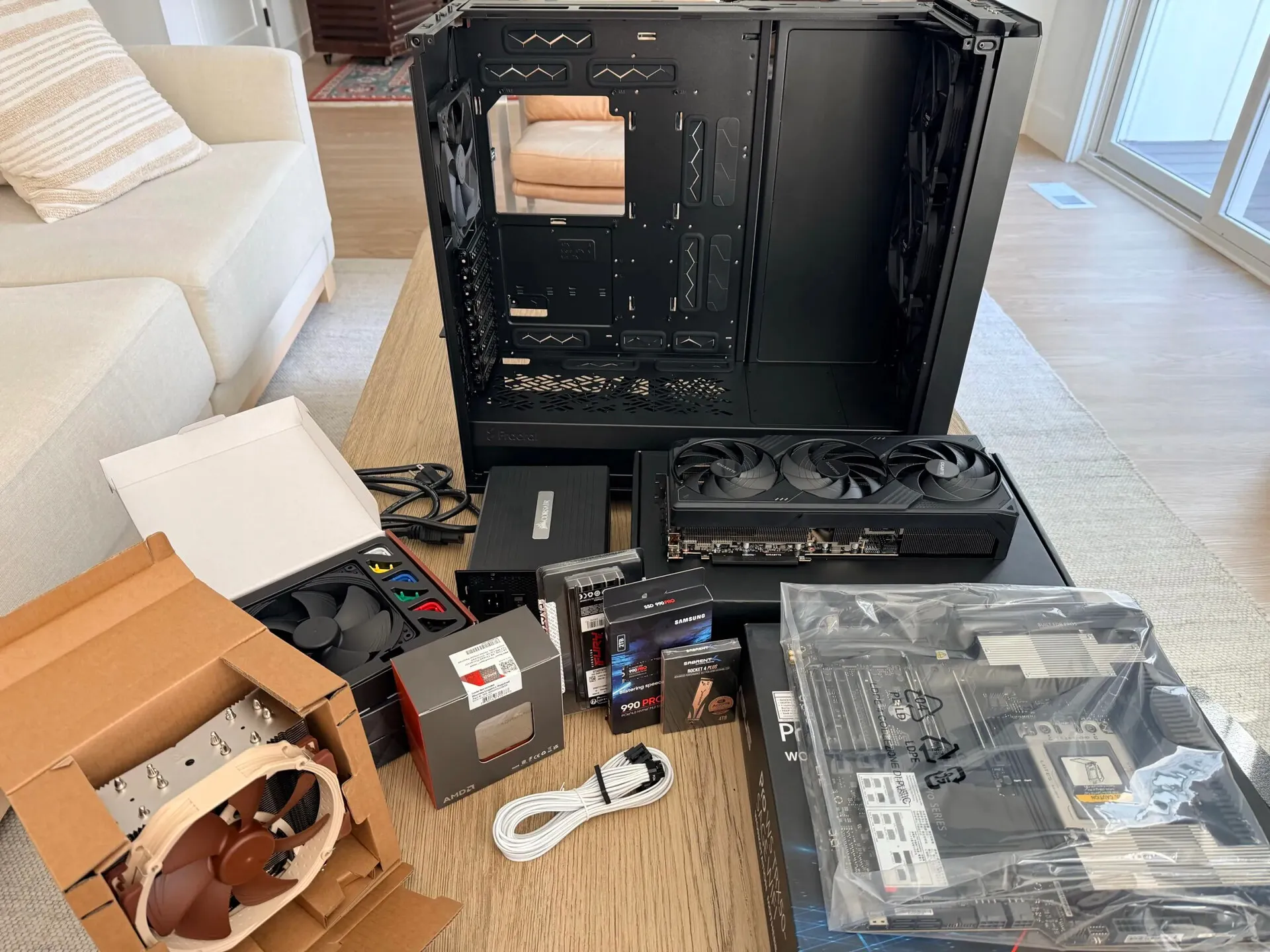
Cortex build components
Components
| Component | Selection | Notes |
|---|---|---|
| CPU | AMD Ryzen Threadripper 7960X | 24 cores / 48 threads on the TRX50 platform. Should comfortably handle concurrent backtesting jobs, ML processing, containers, and VMs. It’s not as fast as the 32-core 7970X and 96-core 7995X, but the extra performance didn’t seem to justify the dramatic price difference. |
| GPU | NVIDIA GeForce RTX 5090 | 32 GB GDDR7 VRAM. Most of the build was designed around this GPU. I did a lot of hunting for a 4090, but all the cards I found were priced about the same as the newer 5090s. So, here I am. Should be comfortable with local LLMs up to ~34B (72B usable with quantization) and LoRA / QLoRA fine-tuning of 7B–32B models; not intended for full foundation-model pretraining. |
| Motherboard | ASUS Pro WS TRX50-SAGE WIFI | Up to 1 TB ECC memory, multiple GPUs, multiple NVMe slots, 10 GbE networking, and large PCIe expansion. |
| Memory | 128 GB Kingston ECC Registered DDR5 | RDIMM at DDR5-4800 MT/s. Headroom to run training datasets, multiple local models, IDEs, browsers, containers, VMs, and backtesting at once. |
| OS drive | 2 TB Samsung 990 Pro NVMe SSD | Room for multiple Linux distros and local applications. |
| Secondary drive | 4 TB Sabrent Rocket 4 Plus NVMe SSD | Room for many large repos, AI datasets, and backtesting market data. |
| Power supply | Corsair AX1600i | 1600 W, powers the current components with headroom for another GPU or more storage. |
| Case | Fractal Design Meshify 2 XL | This is a massive case with room for additional GPUs and SSD / HDD arrays. |
| Cooling | Noctua CPU air cooler + 3 Noctua fans + 1 Fractal stock fan | Cools the 7960X and the rest comfortably without the complexity of liquid cooling. |
Assembly
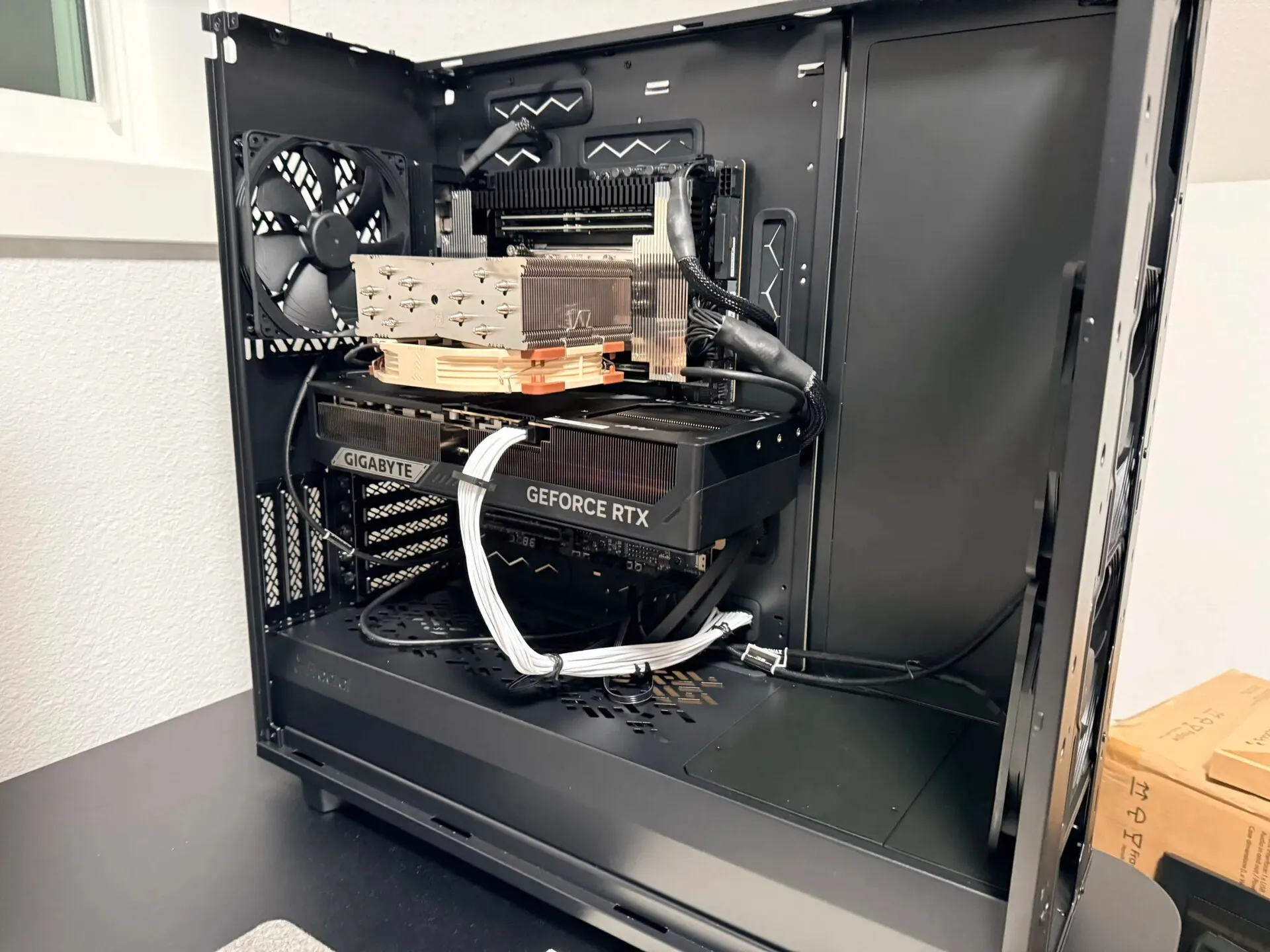
Cortex mostly assembled. As per some advice I found later, I ended up rerouting the white GPU power cord over its body instead of under, to avoid putting downward pressure on the GPU's power connector pins. Still lots of room left over in the massive case for future upgrades.
Assembling all the components was a mostly smooth process, though some of the steps required a steady hand. Installing the CPU onto the motherboard was nerve-wracking because closing the CPU lever requires a bit of force, and the pins are very delicate and did not want to line up perfectly on the first try.
Also, the way the power supply was situated in the bottom of the case made it very difficult to access the back panel where all the cords plug in. This was probably the hardest part of the build, figuring out how to actually get everything plugged into the PSU in such a small space. Eventually I removed the SSD mounts in the lower section, and this improved access to the PSU.
First Boot and Linux Install
Booting up with Linux was not without a couple hurdles. I decided to start with Ubuntu and installed from a USB drive.
BIOS Error
Initially, I got an error from the BIOS saying:
CPU Fan speed detection error! Please ensure your CPU cooler is properly connected to the CPU_FAN header
This was because I had connected the CPU cooler fan to CHA_FAN1 on the motherboard instead of the dedicated CPU_FAN header. Easily corrected.
5090 Card
I got a blank screen after selecting “Try or Install Ubuntu” from the GRUB menu. As I learned, this was likely because Linux’s open source NVIDIA driver Nouveau does not fully support the newer 5090 card at this time. So, the driver crashed and the screen went dark during boot. First, I added the GRUB parameter
nomodesetwhich tells Linux not to initialize graphics or mess with the GPU too much during boot. This helped, and now I could see boot activity logs, though the boot process still hung partway through. This meant that Nouveau was probably still being loaded. Then I added a second GRUB parameter
nomodeset rd.driver.blacklist=nouveauwhich tells hardware discovery during boot to never load the Nouveau driver. This also helped and the boot progressed further than before, but still eventually hung. So, I added a third GRUB parameter
nomodeset rd.driver.blacklist=nouveau nouveau.modeset=0which tells Linux if you do still load Nouveau, then just don’t perform mode setting, which is the dangerous part. After adding the third param, Ubuntu was able to launch the installer and complete the process.
After the OS installation, I installed NVIDIA’s proprietary drivers, which know how to operate the GPU correctly. From then on, subsequent reboots would use those. Once Ubuntu + new drivers were installed, I was more or less off to the races.
Note: I was using the Ubuntu Server ISO on my boot drive, which just uses a text installer. But even in this case, Linux still has to set up a display and load a GPU driver.